How to Activate Your ComfortFiles License
Updated August 14, 2026
Activation takes one paste and one click. The panel lives in the ⋯ menu in the toolbar, next to the other app-wide settings, rather than in a separate store window.
Activate
- Open the ⋯ menu in the toolbar.
- Choose License…
- Paste your key into the field — it begins with
sk_. - Click Activate.
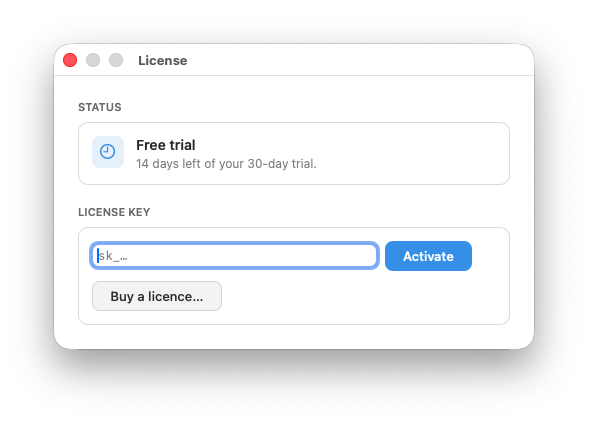
That is the whole flow. The key is verified once, so you need to be online for that moment; after it, ComfortFiles never checks in again to let you keep working.
The same panel shows where you stand before you have a key: Status reads Free trial with the days remaining, and turns into your licence once one is activated.
One license, three Macs
A license covers three Macs you own or control — a desktop, a laptop, and the one you have not replaced yet.
If you retire a machine, open ⋯ → License… on it and click Deactivate this Mac. The slot is freed immediately and can be used on the new Mac straight away. No support ticket, no waiting.
If you no longer have access to the old machine, write to [email protected] and the slot will be released for you.
If the trial has ended and you have no key yet
Nothing is taken away. The app keeps working and shows a reminder — no lock, no read-only mode, no files held hostage. That is deliberate: a file manager that stops opening your folders on a Tuesday because a date passed is not a file manager you can rely on.
Related
- What ComfortFiles costs and what happens after the trial
- Uninstalling ComfortFiles — releasing a license first is the tidy order.
Frequently asked questions
Where do I enter my license key?
Open the ⋯ menu in the toolbar and choose License…. Paste the key into the field and click Activate.
What does a license key look like?
It starts with sk_ followed by a long string. Paste it whole, exactly as you received it — no spaces before or after.
How many Macs can I use one license on?
Three. Install ComfortFiles on up to three Macs you own or control.
How do I move my license to a new Mac?
On the machine you are retiring, open ⋯ → License… and click Deactivate this Mac. That frees the slot immediately, with no support ticket, and you can then activate the new machine.
Do I need an internet connection to activate?
For the moment of activation, yes — the key is checked once, and releasing a Mac needs a connection too. Ordinary use afterwards does not: the app never phones home to let you keep working.
What happens when the trial ends and I have no key?
The app keeps working. You will see a gentle reminder, never a lock-out — nothing you have made or arranged becomes inaccessible because a date passed.