How to Change the Language in ComfortFiles
Updated September 14, 2026
ComfortFiles speaks eleven languages, and on a normal Mac you never have to say which one: it asks the system and opens in the language your Mac is already set to.
English · Русский · Українська · Deutsch · Français · Español · Ελληνικά · 日本語 · 한국어 · 简体中文 · 繁體中文
Simplified and Traditional Chinese are separate on purpose: a Mac set to Traditional Chinese — as most are in Taiwan and Hong Kong — is not offered Simplified by macOS, and would otherwise open in English.
Every word the app shows goes through the translation — the menu bar, the right-click menus, Settings, every dialog, the messages that explain what went wrong. Not the buttons with the rest left in English.
Choosing a different one
Some people read one language and prefer software in another. Some are setting up a Mac for a relative. For both:
- Press ⌘, to open Settings — you land on General.
- Open the Language menu.
- Pick a language, and choose Restart Now when it asks.
The restart is real and not a formality: an app reads its words once, when it starts, so a language you pick while it is running cannot reach the windows already on screen. Choosing Later keeps your choice and applies it the next time you open ComfortFiles.
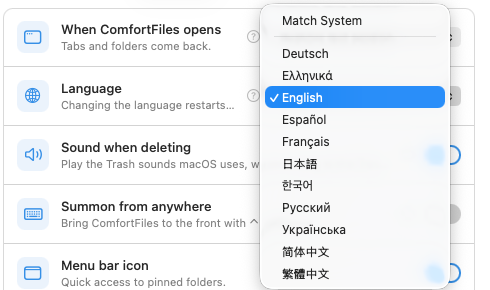
Match System is the first item and the default. It means “whatever the Mac is set to” — including when you change the Mac later.
Why the list is short
The menu offers the languages your Mac says you read or type, plus English. A picker with eleven names in it when you read two of them is a list you have to search rather than choose from.
If the language you want is not there — you are setting the Mac up for somebody else, say — Show All Languages at the bottom of the menu shows every one ComfortFiles has.
What does not change with it
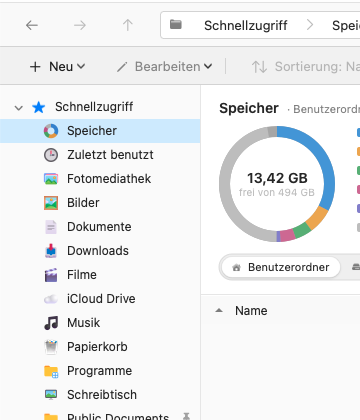
Your folder names. Desktop, Documents, Downloads, Pictures, Movies and Music are named by macOS, in the language the Mac is set to, and the Finder shows exactly the same names. ComfortFiles asks the system for them rather than translating them itself — so on an English Mac they stay English even with ComfortFiles in Russian. That is deliberate: two apps disagreeing about what your folders are called would be worse than a mixed window.
The kind of each file. “PDF document”, “JPEG image” — also macOS’s words, and also already in the Mac’s language.
The AI features. Suggesting a folder name works in English, whatever the interface says. Apple’s on-device model is asked in English on purpose, because that is the language it is most reliable in.
Good to know
- The choice is stored where macOS keeps it, which is the same place System Settings ▸ General ▸ Language & Region ▸ Applications writes if you set a per-app language there. Set it in either place and the other agrees.
- Update notices are translated too — those come from the framework that checks for updates, which ships its own translations for far more languages than we do.
- Found a sentence that reads wrong? Send it to us: ComfortFiles ▸ Report a Problem…. Two of the eleven languages are read by the person who made the app; the rest reached you translated but not yet read by a native speaker, and a screenshot of an awkward line is genuinely useful.
Frequently asked questions
Which languages does ComfortFiles speak?
Eleven: English, Русский, Українська, Deutsch, Français, Español, Ελληνικά, 日本語, 한국어, 简体中文 and 繁體中文. Every word the app shows is translated — menus, settings, dialogs and error messages — not just the buttons.
Do I have to set the language at all?
No. ComfortFiles follows your Mac. If your Mac is set to German, ComfortFiles opens in German the first time you launch it, with nothing to choose. The setting exists for the case where you want to disagree with that.
How do I change it?
Open Settings (⌘,), stay on General, and pick from Language. ComfortFiles offers to restart, because the words are read once when the app starts.
Why do I not see my language in the list?
The list is narrowed to the languages your Mac says you read or type, so it is short rather than a wall of names. Choose Show All Languages at the bottom to see every language ComfortFiles has.
Why are Desktop, Documents and Downloads still in English?
Because those are not our words. macOS names your folders in the language the Mac is set to, and the Finder shows the same names — so if we translated them, the two apps would disagree about what your folders are called. Set the Mac itself to another language and the folder names follow.
What if ComfortFiles does not have my language?
It opens in English. That is macOS choosing the closest thing it has rather than an error, and nothing is lost — every feature works the same in every language.